SurfPal: Track Website Time and Block Distracting Websites
Introduction
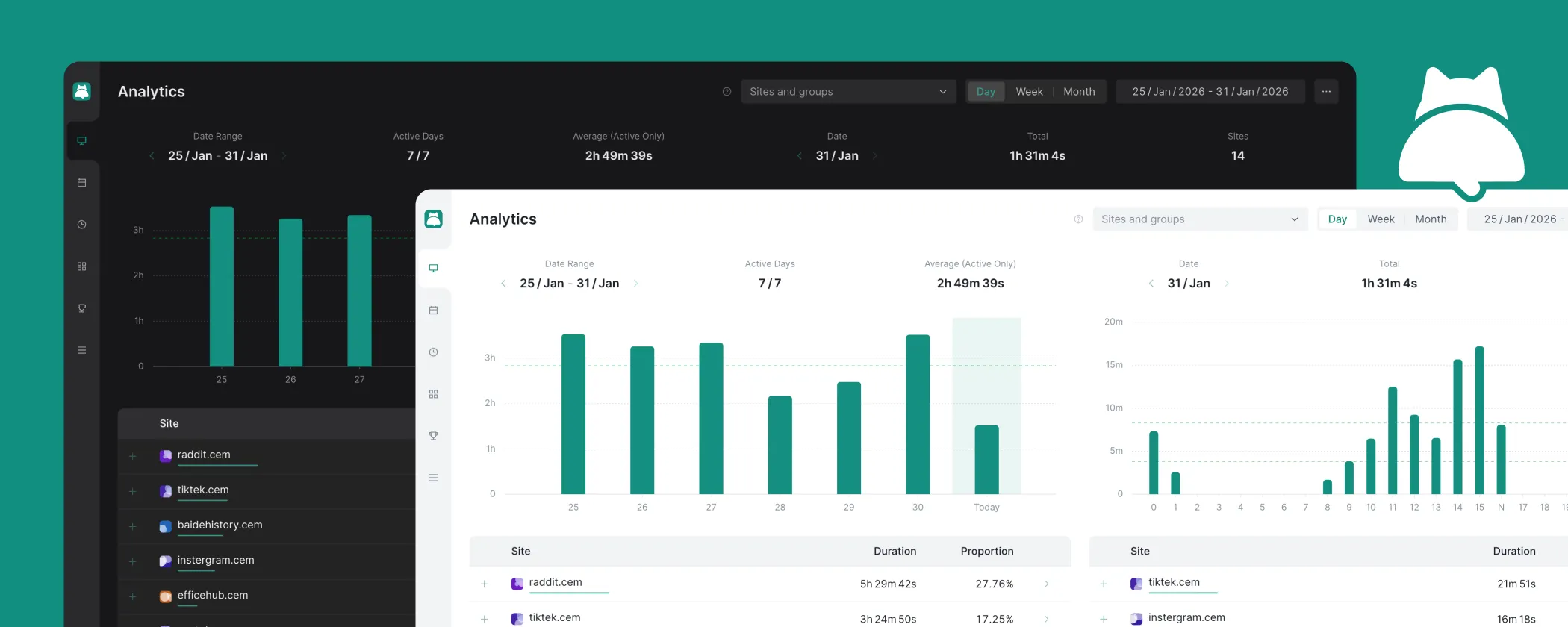
SurfPal is a website blocker and time tracker for Chrome and Edge. It automatically tracks how much time you spend on each website, helps you analyze your browsing habits, and lets you set time limits and scheduled blocks to reduce distractions and mindless browsing.
If you want to see how much time you spend on YouTube, social media, news sites, or other websites, or limit access to distracting sites, SurfPal gives you both website usage tracking and flexible blocking tools. See where your time goes first, then create rules that fit your work, study, and everyday browsing habits.
Installation
SurfPal is now available on the Chrome Web Store and Edge Add-ons. Please click the corresponding link based on the browser you use:
Features
SurfPal covers the complete workflow from data tracking to behavioral restriction. Below is a detailed explanation of each feature:
Data Analytics
Data analytics is the foundation of time management. After all, only when you can clearly see where your time goes can you truly manage it. Generally speaking, a good data analytics feature needs to answer these questions:
- Which websites do I spend the most time on?
- During which time periods do I usually browse these websites?
- What changes have happened to my online time recently?
Based on these needs, SurfPal provides the following features:
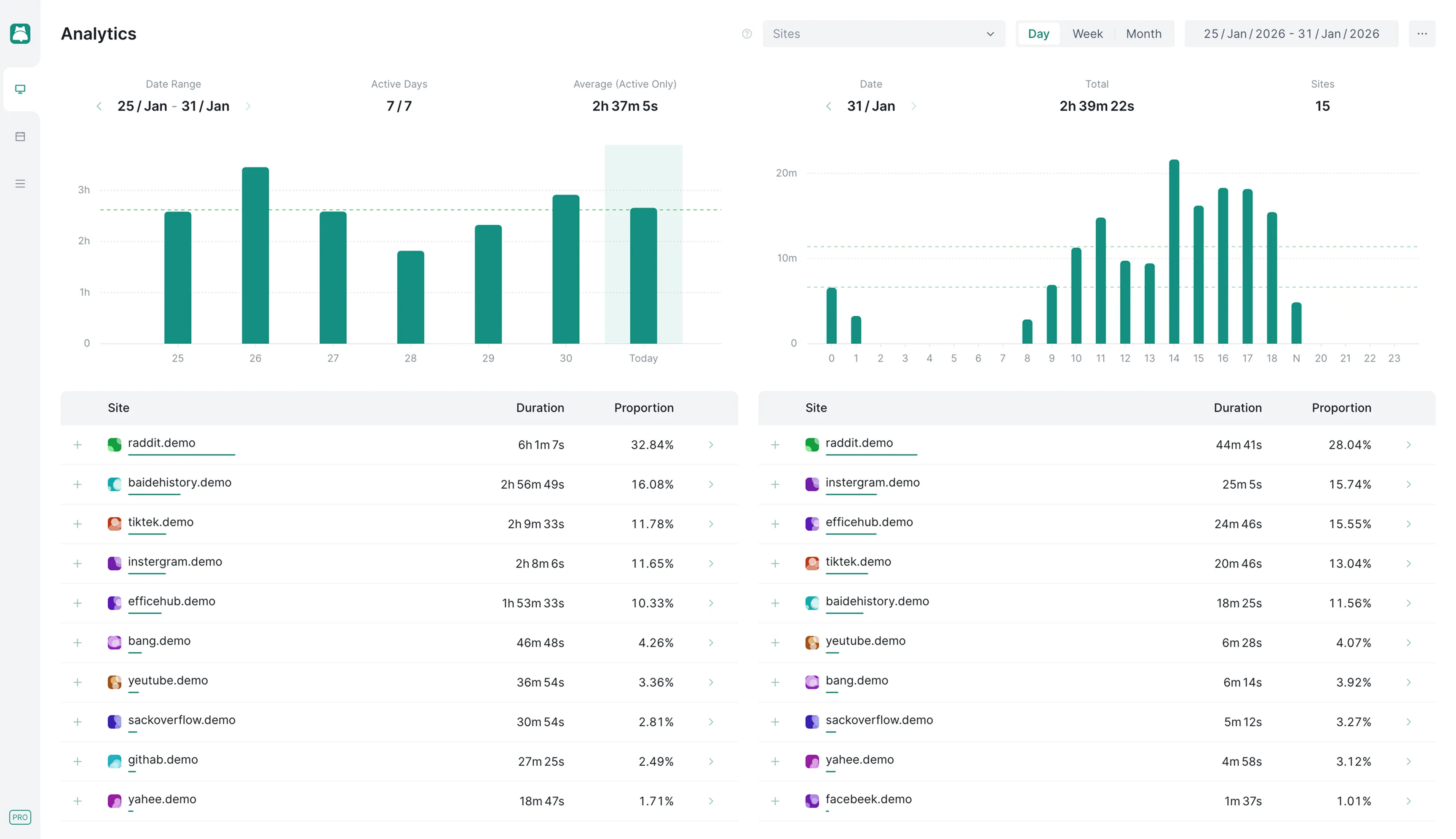
- Scope Filtering: Select one or more websites for analysis.
- Granularity Selection: Aggregate data by day, week, or month.
- Time Selection: Select a specific time range for analysis.
- Data Summary: View statistics such as total duration, average duration, and active days.
- Time-Series Chart: Display trends in browsing duration through charts.
- Details List: Display detailed data for each website, including browsing duration and proportion.
- Data Export: Export data in CSV format for further analysis in other tools.
The data analytics interface is shown below. The interface is divided into two sections, left and right, with the same structure. The right side is used to display drilled-down data:
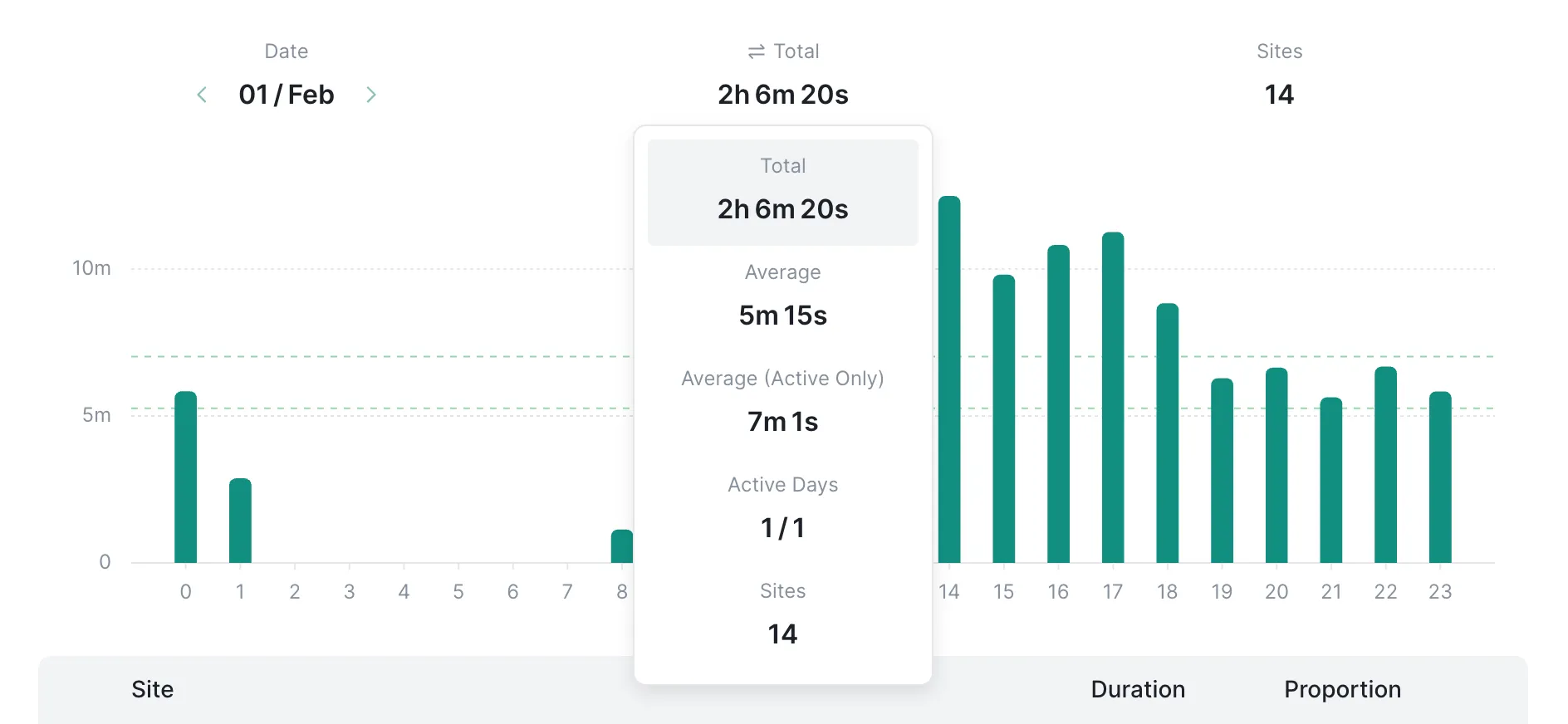
You can click the statistical indicators above the chart to switch to the data dimension you are interested in:
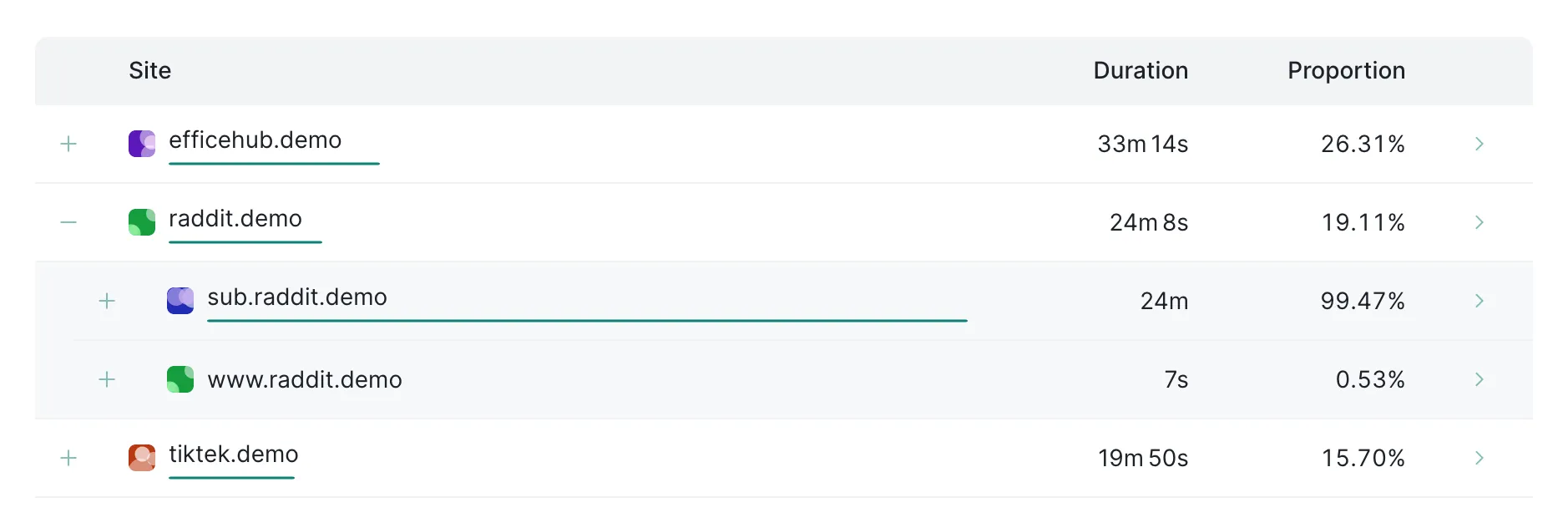
After expanding an item in the details list, you can also view data for its subdomains:
Focus Plan
You can use a plan to help yourself build better online habits. Within a single plan, you can use two ways of restricting browsing behavior at the same time: one is blocking based on fixed time periods, and the other is blocking based on browsing duration.
Here is an example plan: Every day from 9:00-12:00 and 14:00-17:00, access to x.com, tiktok.com, and youtube.com is limited, while music.youtube.com is excluded. At the same time, these sites can be browsed for up to 3 hours per day, and each visit can last up to 20 minutes.
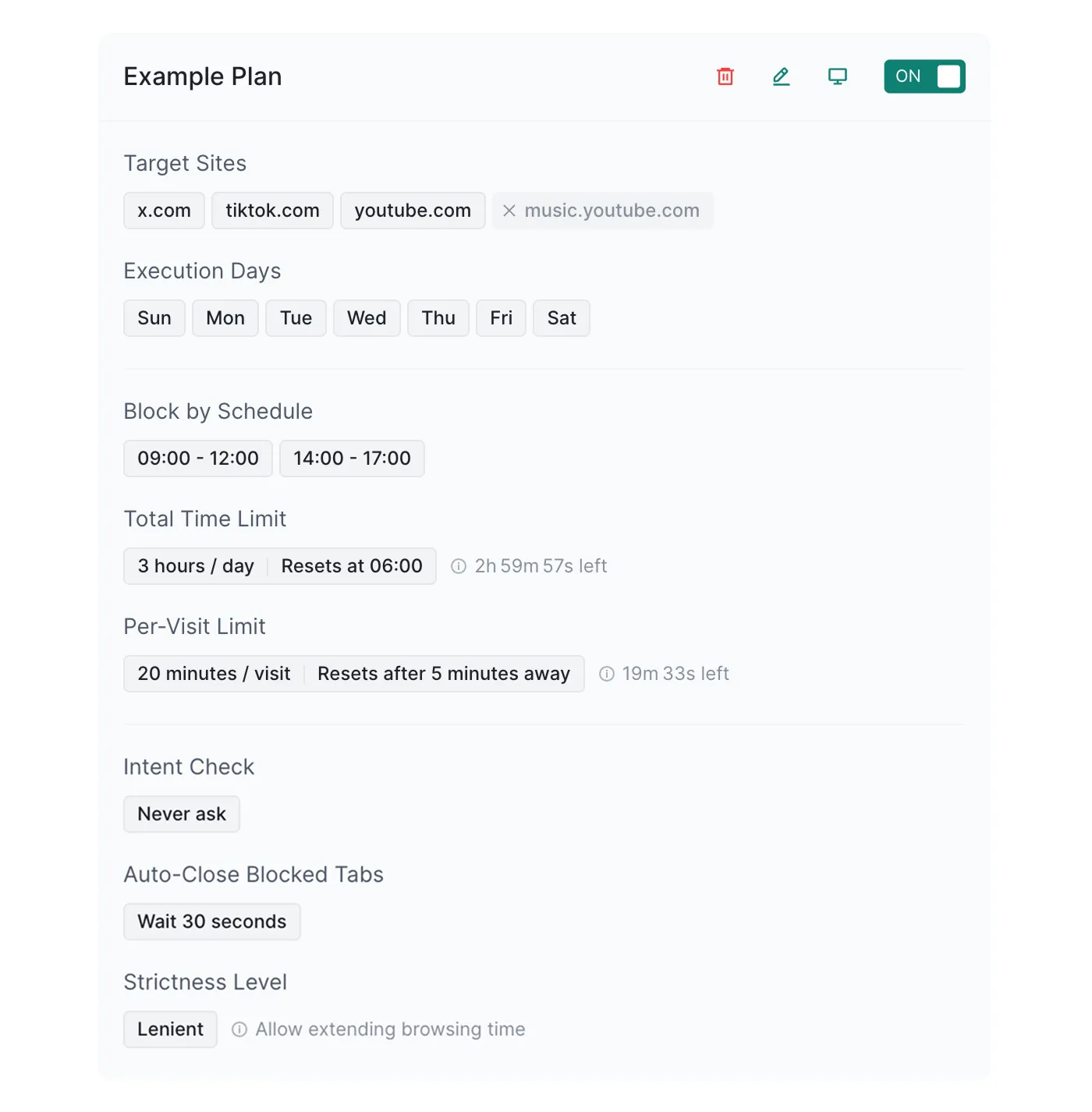
Each plan contains the following configuration items:
- Name: The name of the plan. When blocked, this name will be displayed on the blocking page.
- Target Sites: The list of websites to restrict.
- Excluded Sites: Exclude these websites from the target sites list. This is often used to allow access to certain subdomains.
- Execution Days: The days of the week on which the plan runs, such as only on weekdays.
- Time Slot (Block by Schedule): Target sites cannot be accessed during these time slots.
- Max Duration (Total Time Limit): The maximum amount of time allowed for browsing target sites within one period.
- Period (Total Time Limit): How often the browsing duration resets. After each period ends, the browsing duration is cleared and tracking starts again.
- Reset Time (Total Time Limit): The time point from which the browsing duration starts being calculated again. You only need to set one of the time points.
- Max Duration (Per-Visit Limit): The maximum browsing time allowed each time you visit target sites.
- Reset Interval (Per-Visit Limit): How long you need to stay away from target sites before the next visit is counted as a new visit.
- Intent Check: Whether you need to wait a few seconds and confirm before continuing to access a target site.
- Auto-Close Blocked Tabs: How long SurfPal should wait before automatically closing related tabs after a website is blocked.
- Strictness Level: Whether you are allowed to extend time and continue accessing target sites after being blocked.
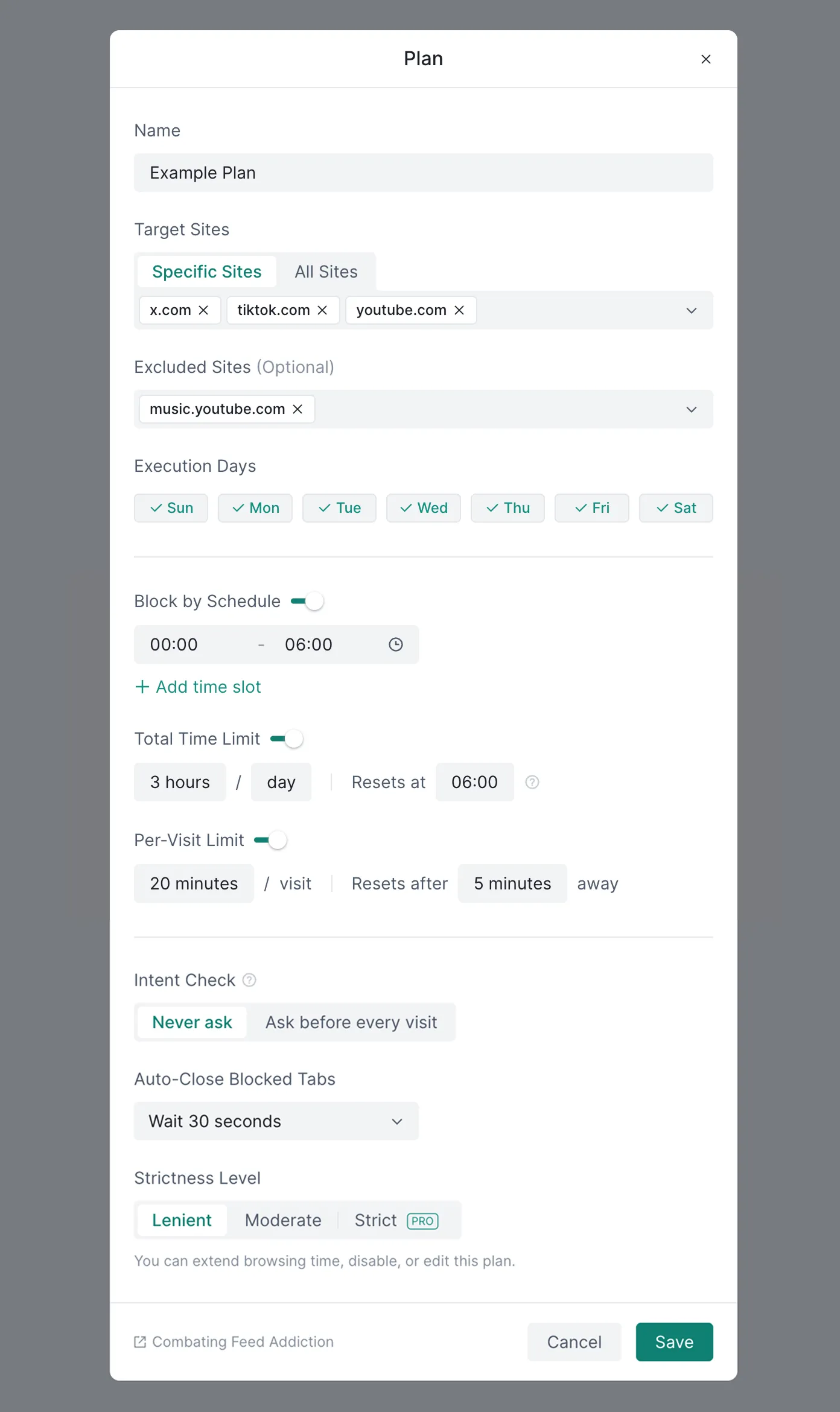
Block by Schedule, Total Time Limit, and Per-Visit Limit can be enabled together, or each can be enabled on its own.
If a website is included as a target site in multiple plans, it will be blocked as long as any one of those plans meets its blocking conditions. You can resolve conflicts between plans by configuring the excluded sites list in each plan. For example, suppose you have one plan whose target sites are all sites with a daily time limit of 1 hour, and another plan whose target site is example.com with a daily time limit of 2 hours. In this case, example.com will be included in both plans, and the actual effect will be a daily time limit of 1 hour, which does not match your expectation. To avoid this, you can add example.com to the excluded sites list of the former plan, so the two plans will no longer conflict.
If intent check is enabled, SurfPal will first display the following confirmation page when you open a target site. Only after clicking “Continue” will you enter the target site:
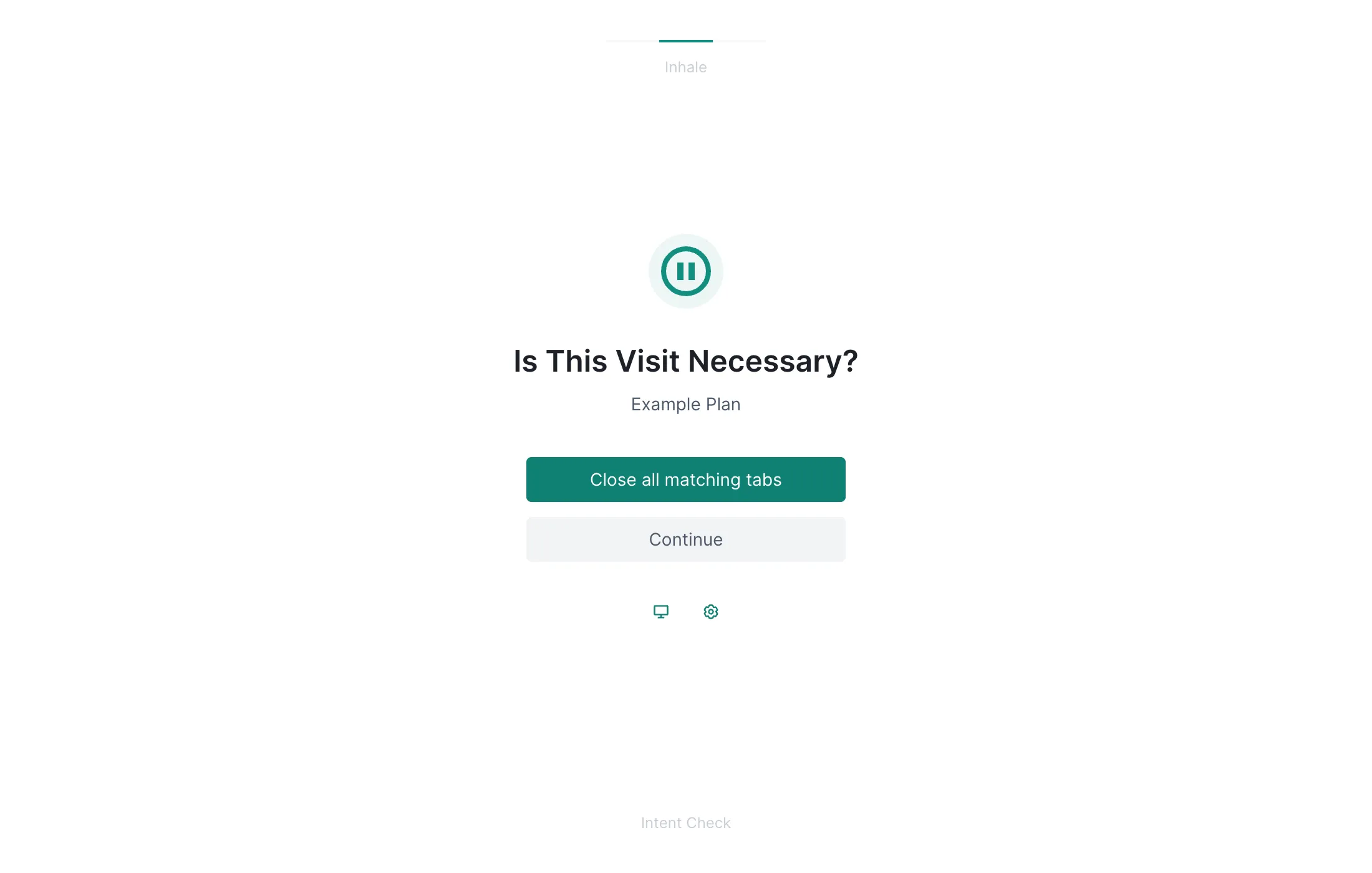
This mechanism does not simply prevent you from visiting a website. Instead, it adds a brief pause between “wanting to open a website” and “actually entering the website.” Many distracting behaviors happen automatically: seeing a cue, feeling an impulse, clicking immediately, and then receiving instant feedback. By adding a few seconds of waiting, SurfPal interrupts this habit loop, giving you a chance to become aware of what you are doing and decide whether this visit is truly necessary.
When you visit a website blocked by a plan, SurfPal will display the following blocking page:
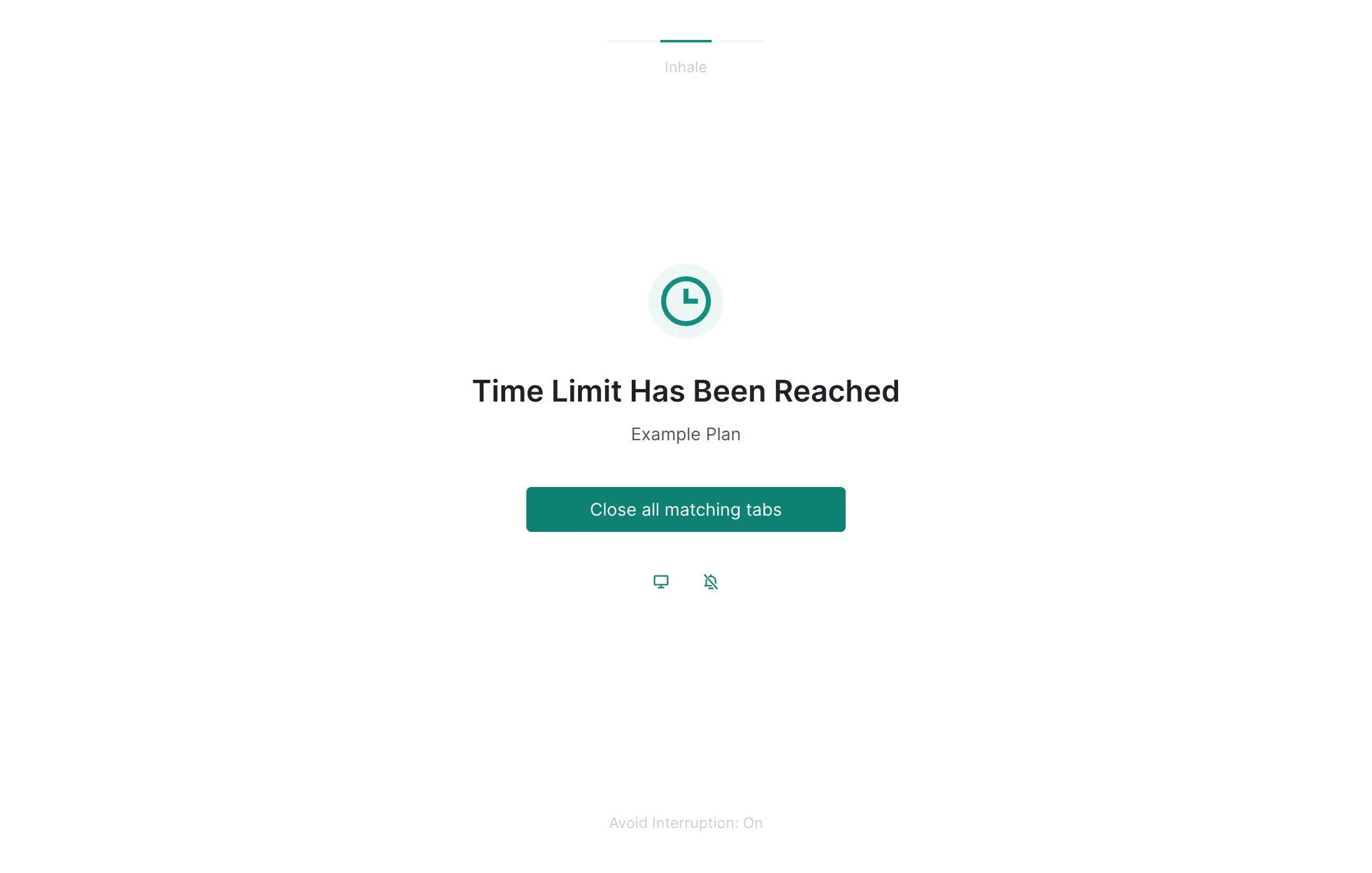
You can close all related tabs directly, or let SurfPal temporarily ignore the plan for a short period of time and continue accessing the website. Whether ignoring a plan is allowed depends on the strictness level you have set.
If you set the strictness level to “strict”, SurfPal will not allow you to ignore the plan after you reach the browsing duration limit. You also cannot bypass the limit by modifying the plan configuration until blocking ends. You can also set a time point before which plan configuration changes are not allowed.
If you use plans to combat feed addiction, combining them with this technique will work even better.
Data Synchronization (Cloud Backup)
Data synchronization can back up SurfPal’s data to the cloud, namely your Google Drive, to prevent data loss and support data synchronization across multiple devices. Once enabled, SurfPal uploads data from the local database to your Google Drive every 10 minutes, and downloads data from the cloud for restoration when needed.

This feature is especially suitable for users who want to keep data consistent across multiple devices or multiple browser profiles. Even if you switch devices or reinstall your browser, you do not need to worry about losing long-term accumulated data.
Site Duration Badge
The site duration badge is a frequently used feature. It displays a badge on the SurfPal icon in the browser toolbar, showing today’s browsing duration for the website you are currently visiting. The badge refreshes at least once per minute, helping you stay aware of your online time at any moment.
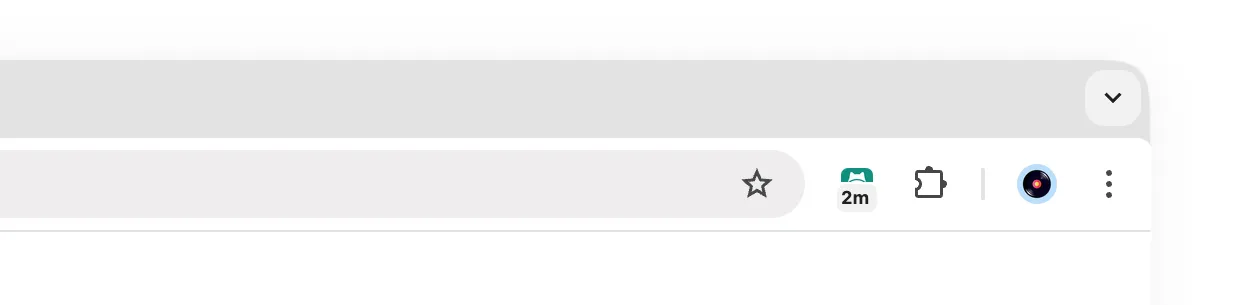
When you visit a website, SurfPal checks whether the website is about to be blocked. If a restriction is about to be triggered, the badge turns red a few minutes in advance to remind you that little time remains.
Core Concepts
Currently, SurfPal tracks and manages time by domain name. Domain names have a hierarchical structure. For example, gemini.google.com is a subdomain of google.com, and drive.google.com and docs.google.com are also subdomains of google.com. Therefore, SurfPal adds the browsing duration of these subdomains to the parent domain, forming the following hierarchy:
google.com (15min + 20min + 7min = 42min)
  ├── gemini.google.com (15min)
  ├── drive.google.com (20min)
  └── docs.google.com (7min)
The concept of domain hierarchy is widely used across SurfPal’s feature modules. For example, in data analytics, you can view the total browsing duration of a domain and all of its subdomains. In this way, you can easily understand your total browsing duration on a broad category of websites, such as google.com, while also viewing the usage of specific subdomains, such as drive.google.com.
By default, selecting a domain means including all of its subdomains. For example, selecting google.com means including google.com and all of its subdomains, such as drive.google.com, docs.google.com, and so on. If you only want to select a domain without including its subdomains, you can use the @. prefix to exclude its subdomains. For example, @.google.com means google.com but does not include its subdomains.
How It Works
SurfPal is built on modern Web technologies with a high-performance, low-power architecture. During use, you will rarely encounter common issues found in similar extensions, such as lag or excessive power consumption.
After SurfPal is installed, it listens in the background for browser user interaction events, including tab creation, removal, update, and activation events, as well as browser window focus and blur events. SurfPal calculates your browsing duration precisely based on when these events occur, and stores the data in the database at domain granularity.
When you use the data analytics feature, SurfPal reads from the database, organizes the data into a tree structure based on the domain hierarchy, accumulates browsing duration, and ultimately generates the analysis results. Data is stored using the browser’s built-in local database, IndexedDB, with appropriate indexes. Even if you have accumulated years of data, queries can still be completed quickly.
When you browse the web, SurfPal checks at least once per minute whether access should be blocked. If access needs to be blocked, SurfPal displays an overlay on the current page, telling you that the site has been restricted and providing related options, such as closing the tab or temporarily ignoring the restriction.
Combating Feed Addiction
If you find yourself deeply addicted to short-video platforms, social media, or news websites, SurfPal’s time restriction features alone may not be enough. You also need to combine them with some neuroscience-based techniques. Try setting a simple rule for yourself: after watching a video or reading a post, immediately summarize its core content in your own words in your mind. If there is an opinion, extract the opinion. If there is a story, summarize the plot. If there is neither, simply describe the image.
At first, you may not even be able to form a complete sentence, because your brain has already become used to being lazy while scrolling through feeds. At this stage, your summary can be very rough, or even just a few keywords. How good the summary is does not matter, and whether your browsing duration decreases does not matter either. What matters is rebuilding the habit of active thinking during this process. This is a key turning point. Treat it as an expression exercise. As you continue practicing, gradually ask yourself to express things more specifically and accurately. If you want to strengthen the effect further, you can also ask yourself to write a comment that includes logical analysis or concrete feelings.
Please note that you do not need to summarize or comment on every piece of content. Never pursue perfection in this matter. Missing some content or being lazy is completely normal. Do not give up because of frustration. Even if the practice is intermittent, simply continuing is enough. Gradually, you will find that when browsing this content, you have shifted from being a passive recipient to an active participant, and your thinking has become more active. This shift will greatly weaken the appeal of feed content, making it much easier to control browsing duration afterward.
Unconscious infinite scrolling and passive watching are low-cognitive-cost, high-dopamine-reward activities, which makes it very easy to get deeply trapped in them. By contrast, “output” and “summarization” require the prefrontal cortex to engage in active thinking, information restructuring, and logical expression. By deliberately creating this cognitive friction, you can not only effectively interrupt impulsive continuous browsing, but also forcibly strip away the false pleasure assigned to information by algorithms. When you stop and try to summarize, you often feel a strong sense of worthlessness: after removing exaggerated sound effects, visual stimulation, and emotional manipulation, you may suddenly realize that the content you could not stop watching just moments ago is, at its core, so empty, homogeneous, or even illogical. When you find that you can hardly extract any substantial information, or that what you summarize is not worth mentioning at all, this moment of clarity, shifting from “deeply obsessed” to “not that impressive,” can often dismantle addictive behavior more thoroughly than simple forced blocking.
Of course, before relying on these techniques, the first thing you should try is keeping yourself meaningfully occupied. In many cases, once you have something clear to do, the appeal of feeds will naturally decrease. You only need to rely on these techniques when you temporarily cannot find a better alternative activity and still find it difficult to stop browsing.
Tool Boundaries
Regarding SurfPal, we want to talk honestly with you about its boundaries. Understanding the limitations of a tool can help you use it better and avoid unrealistic expectations.
SurfPal can add friction between your “impulse” and your “action,” but it cannot prevent you from directly uninstalling the extension or picking up the phone beside you. No software can make the final decision for you. Whether to accept these restrictions still depends on you.
Relying solely on blocking to suppress existing browsing habits often leads to behavioral rebound. After you restrict frequently visited distracting websites, your brain may briefly face a vacuum in dopamine access. If you do not have high-quality activities that you genuinely want to engage in, such as focused work, deep reading, or real hobbies, to fill this empty time, your attention can easily shift to other low-value substitutes. Finding what you truly want to do is far more important than merely prohibiting yourself from doing certain things.
When pursuing self-discipline, what we most easily overlook are often those seemingly insignificant physiological factors. Self-control is not only a psychological struggle, but also a physiological process that consumes the body’s energy. Under conditions of sleep deprivation, insufficient nutrition, high stress, or overwork, the control capacity of the brain’s prefrontal cortex can decline significantly. At such moments, your defense against temptation is at its weakest. Do not try to use rigid rules to fight against physiological limits. Forcing self-discipline in a “low-battery” state will only intensify internal friction. More subtly, this physiological depletion can also distort our cognition. The brain is very good at finding psychological explanations for your emotions. For example, when you feel anxious, it tends to attribute the cause to certain recent events and rationalize this causal chain, making you firmly believe it. However, the true cause may simply be a deficiency in certain vitamins.
Having a healthy body is the foundation of all self-improvement. Please assess whether your daily intake of carbohydrates, protein, and fat is reasonable, whether you lack minerals or vitamins, whether you drink enough water, whether you get enough sleep, whether you exercise appropriately, and so on. Prioritizing your physiological needs is the foundation for maintaining focus and efficiency over the long term.
Entertainment is a necessity of life. Completely depriving yourself of entertainment is not the purpose of time management. The real goal is to eliminate “unconscious loss of control.” Setting a reasonable budget for leisure activities is healthy and necessary. Do not develop severe guilt because you exceeded your browsing limit on a certain day or occasionally let things slide. Such negative emotions can instead intensify self-depletion. Accept objective fluctuations, observe the data, adjust the rules, and start again.
Pricing
SurfPal’s core mission is to help people regain control of their time. Therefore, all core data tracking and behavioral restriction features are completely free, and are sufficient to meet most people’s everyday time management needs.
If you want more reliable data protection or need stronger self-restraint tools, you can consider upgrading to SurfPal Pro. We know that today’s ubiquitous subscription models can easily create psychological burden, so SurfPal Pro uses a simple one-time purchase model: only $19, pay once, use for life.
After upgrading to Pro, you will unlock the following advanced features, all marked with a PRO badge inside SurfPal:
- Data Synchronization (Cloud Backup): Automatically and securely back up local data to your Google Drive, and support seamless synchronization across multiple devices. Even if you switch computers or reinstall your browser, the behavioral data you have accumulated over time will not be lost.
- Full Strictness Level: Unlock the highest level of restriction mode. In addition to providing stronger restraint at the mechanism level, the cost you pay for Pro itself also becomes an extra source of friction, making you more inclined to follow the rules you set for yourself.
- Hourly Data Export: Supports more fine-grained data export. If you like to deeply review how you spend your time, you can import this raw data into Excel or other tools for more professional pivot analysis.
Since the initial release in June 2024, SurfPal has been listening to user feedback and iterating frequently. Your purchase is direct support for the continued operation and improvement of this product.
We hereby promise: users who purchase a lifetime license will enjoy all advanced features added in future versions for free, with no additional payment required. Thank you for your support.
FAQ
Below are some common questions about SurfPal. If you have any other questions, feel free to contact us at any time (support@mutacore.com).
1. Is my personal data safe?
Rest assured that your personal data is stored only in the browser’s built-in local database. Even if cloud backup is enabled, the data will only be uploaded to your own Google Drive. Your data flows only through places you trust throughout the entire process.
2. Will SurfPal affect webpage content loading?
In theory, no. SurfPal was designed to avoid modifying the content of original webpages and does not inject scripts into webpages, so it will not interfere with normal webpage content loading. If you encounter this issue, please first check whether it is caused by another extension.
3. Why does the value displayed by the site duration badge sometimes refresh slowly?
The duration tracking itself is accurate, but the displayed value refreshes at least once per minute, so there may be a slight delay. This is a design trade-off between actual needs and system resource usage.
4. Are there any usage restrictions for the SurfPal Pro license?
One license can be used on up to 5 devices at the same time, which is already fully sufficient for personal use. Please do not share your license with others. If the system detects abuse, the license will automatically become invalid.
5. What should I do if I lose my SurfPal Pro license?
Please send us an email (support@mutacore.com) with a screenshot of your order from the payment channel, including the order number. After verification, we will help you retrieve your license. Sometimes our reply may be mistakenly marked as spam, so please be sure to check your spam folder.
6. Why do SurfPal’s features sometimes stop working?
We have observed that in certain cases, the Chrome browser may fail to wake up SurfPal’s background process, causing clicks on the SurfPal icon to produce no response and causing the timing feature to stop working. This is not a SurfPal bug, but a known Chrome issue. Not only SurfPal, but all extensions using the same mechanism may be affected. Generally speaking, disabling and then re-enabling the extension, or completely restarting the browser, can temporarily resolve the issue. Google has not yet provided an effective official solution, and we will continue to follow the progress of this issue.